
Cursor
Verified FEATUREDAI Coding Agent for Building Ambitious Software
Verified by the maker Details confirmed by Cursor
Overview
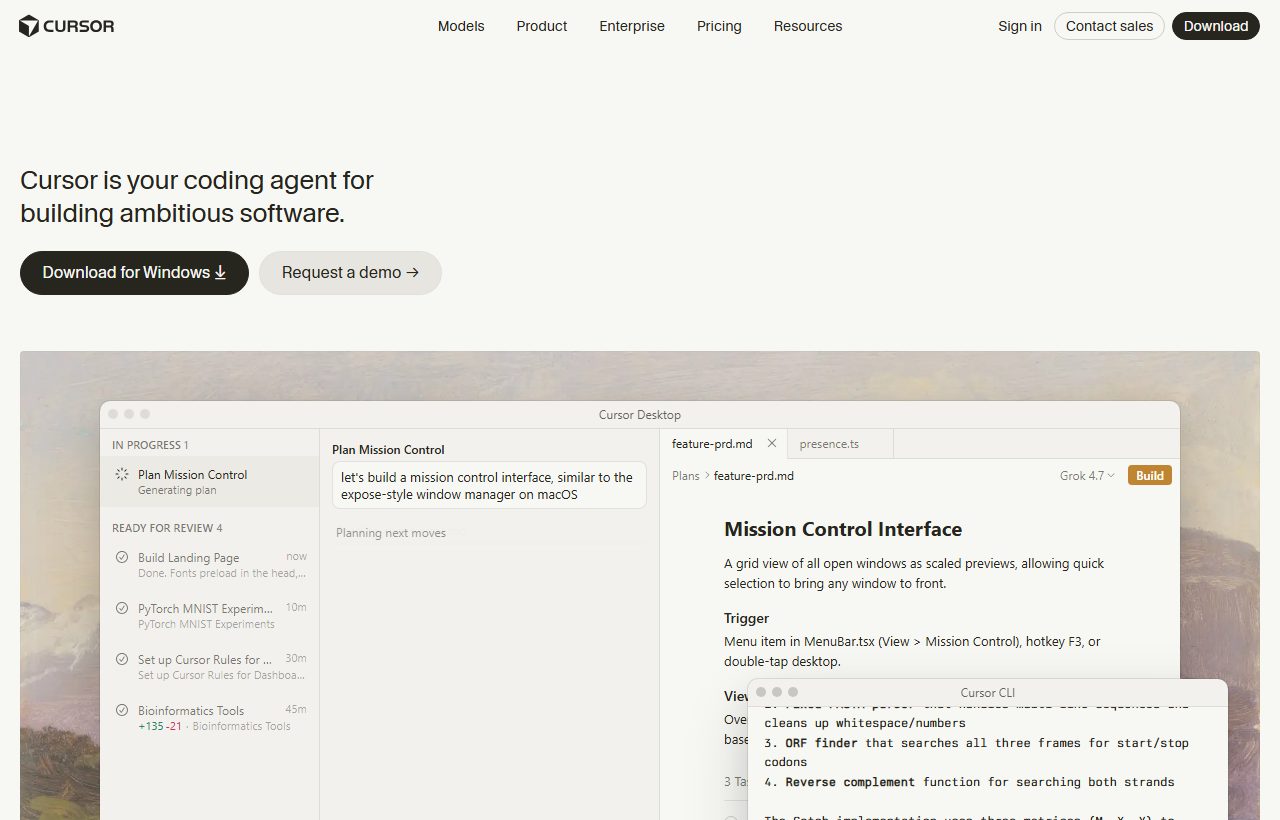
Cursor is a code editor built around an agent. You describe what you want changed and it works across the files in your project, reading the surrounding code before it writes anything, so the result fits the codebase rather than sitting awkwardly inside it. It is a fork of VS.
About Cursor
Cursor is a code editor built around an agent. You describe what you want changed and it works across the files in your project, reading the surrounding code before it writes anything, so the result fits the codebase rather than sitting awkwardly inside it.
It is a fork of VS Code, which means extensions, keybindings and themes carry over on day one. What is new is the agent layer: Composer for multi-file edits, cloud agents that keep working while you do something else, and Bugbot for agentic code review on pull requests.
The company behind it is Anysphere. Teams get shared rules and skills, usage analytics and SSO; larger organisations add pooled usage, access controls and audit logs.
🎥 Cursor demo video
📷 Screenshots
✨ Key Features
Agent across files
Describe a change and the agent edits every file it touches, not just the one you have open.
Composer
Plan and apply larger multi-file changes in one pass.
Cloud agents
Hand a task to an agent that keeps working while you carry on elsewhere.
Bugbot code review
Agentic review on pull requests, billed by usage.
Built on VS Code
Your extensions, keybindings and themes come with you.
MCPs, skills and hooks
Connect your own tools and rules to the agent.
🎯 Target Audience
Working developers
Day-to-day feature work and refactors in an existing codebase.
Small product teams
Shared rules and skills so the agent behaves the same for everyone.
Engineering leads
Usage analytics and agentic review across a team.
Enterprises
SSO, access controls, audit logs and pooled usage.
VS Code users
An upgrade path that does not mean relearning an editor.
⚖️ Pros & Cons
Pros
Cons
👤 Founder / CEO
Michael Truell
Co-founder & CEO, Anysphere
Michael Truell co-founded Anysphere in 2022 with three MIT classmates, after a first attempt at AI tools for mechanical engineering went nowhere. The team pivoted to the problem they actually lived with, writing code, and built Cursor into one of the fastest-growing developer tools ever. He studied computer science and mathematics at MIT.
Pricing Prices from the maker · check cursor.com for current plans
Hobby
Free
- No credit card required
- Limited Agent requests
- Access to Composer
Individual
$20 /mo
- Extended limits on Agent
- Access to frontier models
- MCPs, skills and hooks
- Cloud agents
Teams
$40 /user/mo
- Centralised team billing
- Shared rules, skills and plugins
- Agentic code reviews with Bugbot
- SAML/OIDC SSO
Enterprise
Custom
- Pooled usage
- SCIM seat management
- Audit logs and service accounts
- Priority support
❓ Frequently Asked Questions
What is Cursor?
Built to make you extraordinarily productive, agents turn ideas into code. Accelerate development by handing off tasks to Cursor.
What are the key features of Cursor?
Cursor offers 6 main features. Agent across files: Describe a change and the agent edits every file it touches, not just the one you have open. Composer: Plan and apply larger multi-file changes in one pass. Cloud agents: Hand a task to an agent that keeps working while you carry on elsewhere. Bugbot code review: Agentic review on pull requests, billed by usage. Built on VS Code: Your extensions, keybindings and themes come with you. MCPs, skills and hooks: Connect your own tools and rules to the agent.
How much does Cursor cost?
Cursor uses a Paid pricing model. Available plans include Hobby at Free, Individual at $20/mo, Teams at $40/user/mo, Enterprise at Custom.
What are the pros and cons of Cursor?
Key advantages include: The agent reads surrounding code before editing, so changes fit the project; Everything from VS Code carries over; A free tier that is genuinely usable for small work. Potential drawbacks: Heavier agent use runs into limits or usage-based billing; Large refactors still need a careful human review.
What type of tool is Cursor?
Cursor is listed under Coding on Ai Product Index.
Does Cursor offer a free plan?
Yes, Cursor offers a free plan. No credit card required. Limited Agent requests. Access to Composer
Where can I try Cursor?
You can visit the official Cursor website at cursor.com to sign up, explore features, or start a free trial.
SIDE BY SIDE
Cursor vs Augment Code vs Bolt.new
See at a glance which tool leads on each point. ★ = best in row
| CRITERIA | C Cursor THIS TOOL | A  Augment Code UNCLAIMED Augment Code UNCLAIMED | B  Bolt.new UNCLAIMED Bolt.new UNCLAIMED |
|---|---|---|---|
| Best for | AI Coding Agent for Building Ambitious Software | Agentic software development at organizational scale | Bolt AI builder: Websites, apps & prototypes |
| Starting price | $20 / month ★ Lowest | $20 / month ★ Lowest | $25 / month |
| Free plan | No | No | Yes ★ Only one |
| Verified listing | Yes ★ Only one | No | No |
| Pricing model | Paid | Paid | Freemium |
| Founded | 2022 | Not stated | Not stated |
| Links | Visit Cursor ↗ | View listing | View listing |
REVIEWS
What people say about Cursor
No reviews yet
If you have used Cursor, yours would be the first. Create a free account to leave a review, or sign in if you already have one.
MORE LIKE THIS