
Sprite Fusion
UNCLAIMEDTilemap Editor and Pixel Art Generator for Game Developers
Overview
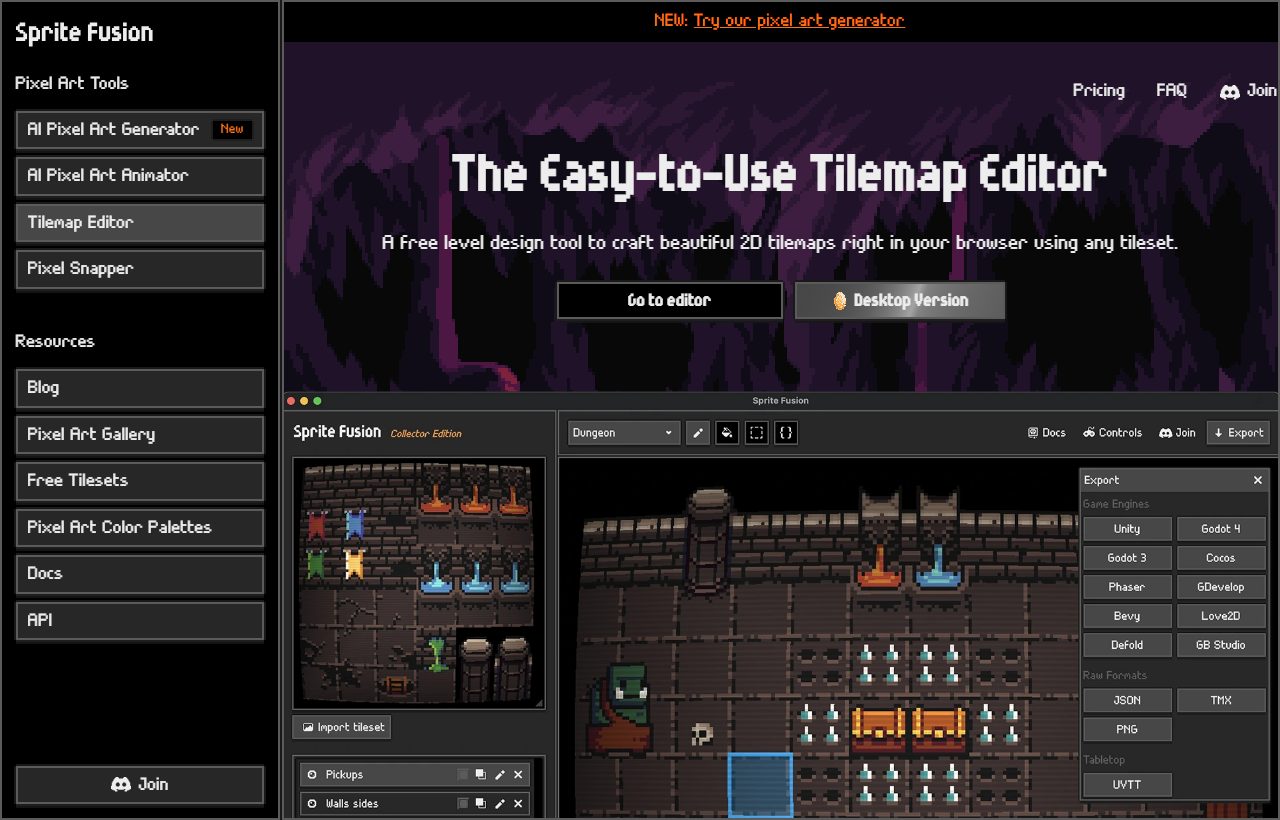
Sprite Fusion is a browser-based tilemap editor and pixel art toolkit for 2D game developers, built by an independent developer. Users drag in or paste any tileset and paint levels using single or multi-tile selections across layers, with auto-tiling that places tiles based on their neighbors to speed up terrain.
About Sprite Fusion
Sprite Fusion is a browser-based tilemap editor and pixel art toolkit for 2D game developers, built by an independent developer. Users drag in or paste any tileset and paint levels using single or multi-tile selections across layers, with auto-tiling that places tiles based on their neighbors to speed up terrain work. Any layer can be marked as a collider, and tilesets from PixelLab are supported natively.
Finished maps export to a wide range of engines and formats, including Unity through a native package, Godot 3 and 4, Phaser, Defold, Bevy, GDevelop, GB Studio and others, as well as JSON, TMX and PNG. Maps can also be exported for virtual tabletops like Foundry VTT and Roll20, with collider layers converted into walls.
Alongside the editor, the site offers AI pixel art tools for generating, animating and editing sprites, a prop generator, and a Pixel Snapper utility for fixing off-grid pixel art. The web edition is free without login for personal and commercial projects, while a one-time-purchase desktop edition adds offline use and removes the map size cap.
Demo video Locked
Hidden until this listing is claimed The owner adds this when they verify Sprite Fusion.
Claim to unlock →Sprite Fusion homepage
✨ Key Features
Browser tilemap editor
Import tilesets and paint layered levels directly in the browser.
Auto-tiling
Places tiles automatically based on neighboring tiles for faster terrain design.
Collision layers
Any layer can be set as a collider for use in game engines.
Multi-engine export
Exports to Unity, Godot, Phaser, Defold, GDevelop and more.
AI pixel art tools
Generate, animate and edit pixel art sprites and 32x32 props.
Pixel Snapper
Cleans up blurry or off-grid pixel art onto a proper grid.
🎯 Target Audience
Indie game developers
Design 2D levels quickly and export them to their engine.
Game jam participants
Build tile-based maps fast without installing software.
Retro game makers
Create maps for Game Boy projects through GB Studio export.
Tabletop game masters
Make battle maps with walls for Foundry VTT, Roll20 and D&D Beyond.
Pixel artists
Generate and clean up sprites, props and animations.
⚖️ Pros & Cons
Pros
Cons
Founder / CEO Locked
Hidden until this listing is claimed The owner adds this when they verify Sprite Fusion.
Claim to unlock →Pricing Prices from the maker · check the maker's own site for current plans
Web Edition
$0
- No login required
- Unlimited projects
- Personal and commercial use
- Map export limited to 4.5MB
Desktop Edition
$14.99 one-time
- Windows and macOS app, fully offline
- No map size limit and faster exports
- Free lifetime updates
- Limited-time price, regularly $19.99
❓ Frequently Asked Questions
Is Sprite Fusion free?
Yes. The web edition is free with no login and allows commercial use, with map exports capped at 4.5MB. A desktop edition is available as a one-time purchase.
Which game engines does Sprite Fusion support?
It exports to Unity, Godot 3 and 4, Phaser, Defold, Bevy, Cocos, GDevelop, Love2D and GB Studio, plus JSON, TMX and PNG.
Do I need to download Sprite Fusion?
No. The main editor runs in the browser on Mac and Windows, although an optional offline desktop app is sold separately.
Can I use Sprite Fusion for commercial games?
Yes. Commercial use is permitted on the free web edition.
Who makes Sprite Fusion?
Sprite Fusion is made by an independent developer, and support is provided through its Discord community.
What is Sprite Fusion?
Create 2D tile maps in your browser with Sprite Fusion's free tilemap editor. Import any tileset and export to Unity, Godot, JSON, TMX, PNG, and more.
What are the key features of Sprite Fusion?
Sprite Fusion offers 6 main features. Browser tilemap editor: Import tilesets and paint layered levels directly in the browser. Auto-tiling: Places tiles automatically based on neighboring tiles for faster terrain design. Collision layers: Any layer can be set as a collider for use in game engines. Multi-engine export: Exports to Unity, Godot, Phaser, Defold, GDevelop and more. AI pixel art tools: Generate, animate and edit pixel art sprites and 32x32 props. Pixel Snapper: Cleans up blurry or off-grid pixel art onto a proper grid.
How much does Sprite Fusion cost?
Sprite Fusion uses a Freemium pricing model. Available plans include Web Edition at $0, Desktop Edition at $14.99one-time.
What are the pros and cons of Sprite Fusion?
Key advantages include: Free web edition with no login, including commercial use; Exports to a wide range of game engines and formats; Runs in the browser on Mac and Windows without a powerful PC; Desktop edition is a one-time purchase with lifetime updates. Potential drawbacks: Web edition limits map exports to 4.5MB; Prop generator is only available in the web version; Limited to 2D tile-based maps.
What type of tool is Sprite Fusion?
Sprite Fusion is listed under Games on Ai Product Index.
Does Sprite Fusion offer a free plan?
Yes, Sprite Fusion offers a free plan. No login required. Unlimited projects. Personal and commercial use. Map export limited to 4.5MB
SIDE BY SIDE
Sprite Fusion vs Rosebud AI vs AI Dungeon
See at a glance which tool leads on each point. ★ = best in row
| CRITERIA | S Sprite Fusion THIS TOOL | R  Rosebud AI VERIFIED | A  AI Dungeon UNCLAIMED |
|---|---|---|---|
| Best for | Tilemap Editor and Pixel Art Generator for Game Developers | Rosebud AI Game Maker | Free AI Text Adventure Game |
| Starting price | Freemium | $50 / month | $14.99 / month ★ Lowest |
| Free plan | Yes | No | Yes |
| Verified listing | No | Yes ★ Only one | No |
| Pricing model | Freemium | Paid | Freemium |
| Founded | Not stated | 2019 ★ Longest running | 2019 ★ Longest running |
| Links | View listing | View listing | View listing |
REVIEWS
What people say about Sprite Fusion
No reviews yet
If you have used Sprite Fusion, yours would be the first. Create a free account to leave a review, or sign in if you already have one.
MORE LIKE THIS