
Spikes Studio
UNCLAIMEDAi clip generator for YouTube Twitch TikTok & Reels
Overview
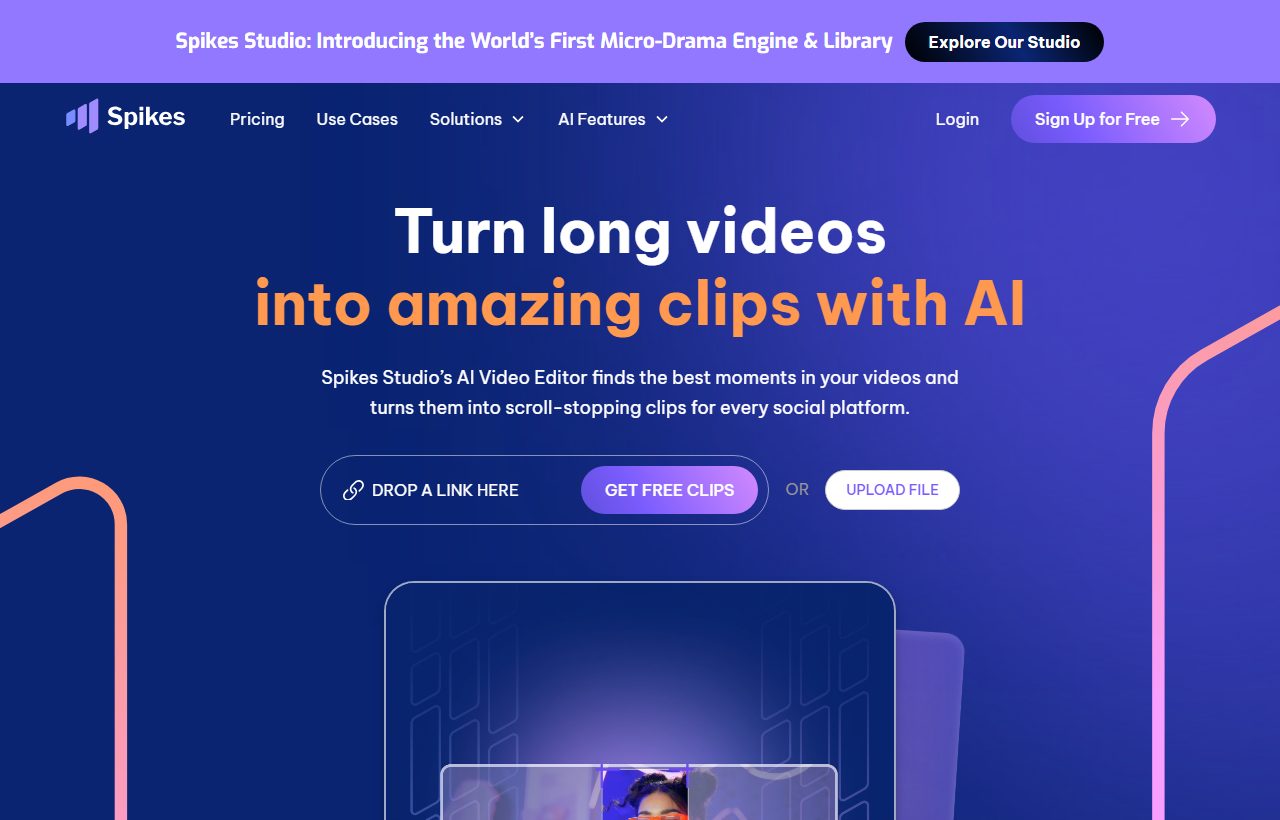
Spikes Studio is an AI video editor that finds the strongest moments in long videos and livestreams and turns them into short clips for TikTok, Instagram Reels and YouTube Shorts. It detects highlights in more than 99 languages, then applies transitions, zooms and on-brand captions.
About Spikes Studio
Spikes Studio is an AI video editor that finds the strongest moments in long videos and livestreams and turns them into short clips for TikTok, Instagram Reels and YouTube Shorts. It detects highlights in more than 99 languages, then applies transitions, zooms and on-brand captions, and resizes each clip for the target platform.
The tool also generates titles, hashtags and emoji for each clip, and includes a scheduler with a visual content calendar for one-click, cross-platform publishing. Connected YouTube, TikTok, Instagram, LinkedIn and Facebook accounts feed an analytics dashboard that tracks historical trends and per-post growth. Folders and collaboration tools help teams and agencies organize projects. The company has more recently added a micro-drama engine aimed at turning existing intellectual property into short serialized videos.
A free plan with a watermark and 720p export covers about 30 minutes of video per month. Paid PRO+ and Enterprise plans remove the watermark, export at 1080p and add AI B-roll, custom templates and faster processing.
Demo video Locked
Hidden until this listing is claimed The owner adds this when they verify Spikes Studio.
Claim to unlock →Spikes Studio homepage
✨ Key Features
AI highlight detection
Finds key moments in long videos in more than 99 languages.
Livestream clipping
Pulls short clips from recorded streams for social posting.
Auto captions and effects
Adds animated captions, zooms and transitions automatically.
AI titles and hashtags
Generates titles, hashtags and emoji for each clip.
Content calendar
Schedules and publishes clips across platforms from one calendar.
Analytics dashboard
Tracks historical trends and growth for each post.
🎯 Target Audience
Streamers
Turn long livestreams into short highlight clips.
Podcasters
Cut episodes into shareable short-form videos.
Content creators
Repurpose long videos for TikTok, Reels and Shorts.
Agencies
Manage clipping, scheduling and analytics for multiple clients.
Churches and media companies
Clip sermons, shows and events for social channels.
⚖️ Pros & Cons
Pros
Cons
Founder / CEO Locked
Hidden until this listing is claimed The owner adds this when they verify Spikes Studio.
Claim to unlock →Pricing Prices from the maker · check the maker's own site for current plans
Basic
$0 /mo
- About 30 minutes of video per month
- Watermark, 720p export
- Auto-captions
- Basic editor
PRO+
$32.99 /mo
- 300 minutes per month
- No watermark, 1080p export
- Animated captions and AI B-roll
- $14.09/mo if billed yearly
Enterprise
$115.99 /mo
- 1,200 minutes per month
- Custom templates and fast processing
- Account manager and unlimited storage
- $56.34/mo if billed yearly
❓ Frequently Asked Questions
Is Spikes Studio free?
Yes, Spikes Studio has a free Basic plan that includes about 30 minutes of video per month, with a watermark and 720p export. No credit card is required.
Can Spikes Studio clip livestreams?
Yes. Spikes Studio can find highlight moments in recorded livestreams and turn them into short clips.
Which platforms can Spikes Studio publish to?
You can connect YouTube, TikTok, Instagram, LinkedIn and Facebook accounts to schedule posts and view analytics.
How much does Spikes Studio cost?
PRO+ costs $32.99 per month on monthly billing or $14.09 per month billed yearly. Enterprise costs $115.99 per month or $56.34 per month billed yearly.
Who makes Spikes Studio?
Spikes Studio is developed by a small team based in Tel Aviv, Israel, founded in 2020.
What is Spikes Studio?
Spikes Studio transforms long content into viral clips for YouTube, TikTok, and Reels. Built with a powerful Ai editor with auto-captions and more.
What are the key features of Spikes Studio?
Spikes Studio offers 6 main features. AI highlight detection: Finds key moments in long videos in more than 99 languages. Livestream clipping: Pulls short clips from recorded streams for social posting. Auto captions and effects: Adds animated captions, zooms and transitions automatically. AI titles and hashtags: Generates titles, hashtags and emoji for each clip. Content calendar: Schedules and publishes clips across platforms from one calendar. Analytics dashboard: Tracks historical trends and growth for each post.
What are the pros and cons of Spikes Studio?
Key advantages include: Free plan with no credit card required; Supports more than 99 languages for clip detection; Built-in scheduler and analytics dashboard; Large discount on annual billing. Potential drawbacks: Free plan adds a watermark and exports only at 720p; Free plan is limited to about 30 minutes of video per month; Paid plans top out at 1080p export.
What type of tool is Spikes Studio?
Spikes Studio is listed under Video Clips on Ai Product Index.
Does Spikes Studio offer a free plan?
Yes, Spikes Studio offers a free plan. About 30 minutes of video per month. Watermark, 720p export. Auto-captions. Basic editor
SIDE BY SIDE
Spikes Studio vs Opus Clip vs ClipZap
See at a glance which tool leads on each point. ★ = best in row
| CRITERIA | S Spikes Studio THIS TOOL | O  Opus Clip VERIFIED | C  ClipZap UNCLAIMED |
|---|---|---|---|
| Best for | Ai clip generator for YouTube Twitch TikTok & Reels | OpusClip: #1 AI video clipping and editing tool | New Release Video Model |
| Starting price | $32.99 / month | $15 / month ★ Lowest | $28.80 / month |
| Free plan | Yes | Yes | Yes |
| Verified listing | No | Yes ★ Only one | No |
| Pricing model | Freemium | Freemium | Freemium |
| Founded | 2020 ★ Longest running | 2022 | Not stated |
| Links | View listing | View listing | View listing |
REVIEWS
What people say about Spikes Studio
No reviews match that filter.
MORE LIKE THIS