
Uizard
Verified FEATUREDUI Design Made Easy, Powered By AI
Verified by the maker Details confirmed by Uizard
Overview
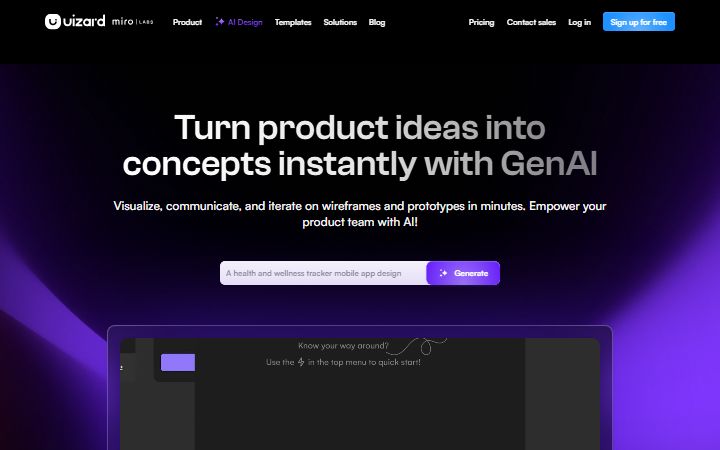
Uizard turns an idea into a designed interface without you knowing a design tool. Describe an app and Autodesigner produces screens, a theme and a clickable prototype you can then edit. Two scanners are the other way in. Screenshot Scanner turns an image of an existing app into an editable.
About Uizard
Uizard turns an idea into a designed interface without you knowing a design tool. Describe an app and Autodesigner produces screens, a theme and a clickable prototype you can then edit.
Two scanners are the other way in. Screenshot Scanner turns an image of an existing app into an editable mockup, and Wireframe Scanner digitises a hand-drawn sketch. Both mean you can start from something rather than a blank canvas.
It is aimed at product managers, founders and marketers more than at designers: people who need to show an idea rather than ship a final design system. Pro plans add developer handoff with React and CSS.
🎥 Uizard demo video
📷 Screenshots
✨ Key Features
Autodesigner 2.0
Generate projects, screens and themes from a description.
Screenshot Scanner
Turn a screenshot into an editable mockup.
Wireframe Scanner
Digitise a hand-drawn wireframe.
Prototyping
Clickable flows, not only static screens.
Templates
Starting points for mobile, web and tablet.
Developer handoff
React and CSS output on Pro and above.
🎯 Target Audience
Product managers
Mockups in seconds rather than a design request.
Startup founders
An MVP to show before building it.
Marketers
Concepts for clients at speed.
Designers
Early iteration before moving into a proper tool.
Students
A free plan for coursework and hobby projects.
⚖️ Pros & Cons
Pros
Cons
👤 Founder / CEO
Tony Beltramelli
Co-founder & CEO
Tony Beltramelli grew up on the French-Swiss border and studied machine learning at the IT University of Copenhagen and ETH Zurich, working as a web developer and then data scientist alongside his studies. In 2017 he built pix2code in his evenings and weekends, turning screenshots into working front-end code. That research became Uizard, which Miro acquired in 2024.
Pricing Prices from the maker · check uizard.io for current plans
Free
$0
- 3 AI generations per month
- Autodesigner 1.5
- 2 projects
- 10 free templates
Pro
$12 /mo
- 500 AI generations per month
- Autodesigner 2.0
- Developer handoff, React and CSS
- Up to 100 private projects
Business
$39 /mo
- 5,000 AI generations per month
- Faster generation
- Custom brand kit
- Unlimited projects and priority support
❓ Frequently Asked Questions
What is Uizard?
UI design for apps, websites, and desktop software in minutes. If you can use Google Slides or PowerPoint, you can use Uizard!
What are the key features of Uizard?
Uizard offers 6 main features. Autodesigner 2.0: Generate projects, screens and themes from a description. Screenshot Scanner: Turn a screenshot into an editable mockup. Wireframe Scanner: Digitise a hand-drawn wireframe. Prototyping: Clickable flows, not only static screens. Templates: Starting points for mobile, web and tablet. Developer handoff: React and CSS output on Pro and above.
How much does Uizard cost?
Uizard uses a Freemium pricing model. Available plans include Free at $0, Pro at $12/mo, Business at $39/mo.
What are the pros and cons of Uizard?
Key advantages include: Gets a non-designer to a usable mockup very quickly; The scanners mean you can start from a sketch or a screenshot; Unlimited free viewers, so sharing costs nothing. Potential drawbacks: Not a replacement for a professional design tool; The free plan's three generations a month go immediately.
What type of tool is Uizard?
Uizard is listed under UI Design on Ai Product Index.
Does Uizard offer a free plan?
Yes, Uizard offers a free plan. 3 AI generations per month. Autodesigner 1.5. 2 projects. 10 free templates
Where can I try Uizard?
You can visit the official Uizard website at uizard.io to sign up, explore features, or start a free trial.
SIDE BY SIDE
Uizard vs Visily vs Magic Patterns
See at a glance which tool leads on each point. ★ = best in row
| CRITERIA | U Uizard THIS TOOL | V  Visily UNCLAIMED Visily UNCLAIMED | M  Magic Patterns UNCLAIMED Magic Patterns UNCLAIMED |
|---|---|---|---|
| Best for | UI Design Made Easy, Powered By AI | AI-powered UI design software | AI Design Tool for Product Teams |
| Starting price | $12 / month | $11 / month ★ Lowest | $20 / month |
| Free plan | Yes | Yes | Yes |
| Verified listing | Yes ★ Only one | No | No |
| Pricing model | Freemium | Freemium | Freemium |
| Founded | 2018 | Not stated | Not stated |
| Links | Visit Uizard ↗ | View listing | View listing |
REVIEWS
What people say about Uizard
No reviews yet
If you have used Uizard, yours would be the first. Create a free account to leave a review, or sign in if you already have one.
MORE LIKE THIS